
I Accidentally Exposed My API Key — Here's What I Learned
A simple mistake that exposed a critical gap in my API security.
A real-world mistake that highlights why API keys should never live on the frontend.
So, I messed up. Pretty badly, actually.
I was working on this Google Gemini clone project, one of those fun side projects where you think you're being clever and efficient. Everything was working great. The API calls were going through, responses were coming back perfectly, and I was feeling pretty good about myself.
Then I opened the browser's Developer Tools to debug something completely unrelated.
That's when I saw it. My API key. Just sitting there. In plain view. In the Network tab.
The Mistake I Made
Here's what I did wrong. I stored my API key directly in my frontend JavaScript code and made API calls straight from the browser.
When I inspected the Network tab, the API key was clearly visible in the request headers.
That's when it hit me anything sent from the frontend is public.
Discovering the Exposed API Key
Let me show you exactly what I saw that day:
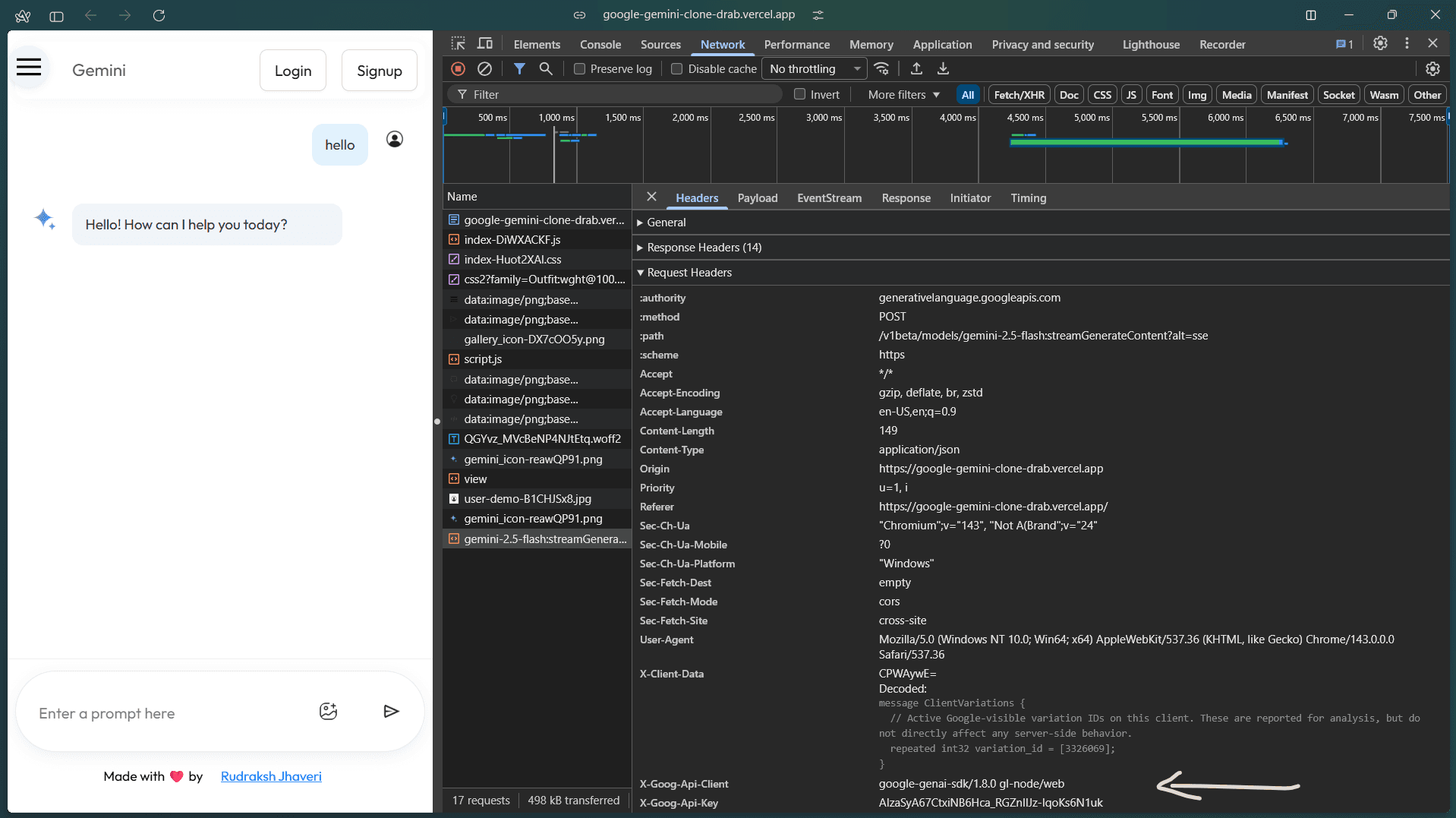

Yeah. That's my API key, right there in the Developer Tools. Any visitor to my site could have found this. They could have copied it, used it for their own projects, racked up charges on my account, or just completely exhausted my API limits.
The worst part? I had no idea how long it had been exposed like this. Days? Weeks? Had someone already found it?
⚠️ Demo Note: This project intentionally demonstrates a common API security mistake for learning purposes.
If you want to explore it and see how the API key was exposed in the browser, you can check it out here:
Google Gemini Clone – Demo
Why This Was So Dangerous
Look, I'm not trying to be dramatic, but this was genuinely bad. Here's what could have happened:
Someone finds my key and starts making thousands of API requests. My bill goes through the roof. I wake up to a notification that I owe Google hundreds or thousands of dollars.
A bot scrapes my site, grabs the key automatically, and adds it to some database of leaked credentials that gets sold or shared online.
My key gets used for something against Google's terms of service, and my entire account gets banned. All my projects that depend on their APIs just stop working.
Or maybe nothing happens at all, and I get lucky. But counting on luck when it comes to security is probably the dumbest thing you can do as a developer.
How I Was Actually Using It
Let me walk you through my flawed logic so you understand just how wrong this approach was.
My frontend had the API key stored as a variable, and the API requests were made directly from the browser.
Because of that, every request exposed the API key in the Network tab. Anyone inspecting the request could see it, copy it, and reuse it.
At that moment, it became obvious that no amount of hiding, encoding, or obfuscation would have helped. The real problem was making API calls directly from the frontend.
Even if I had used Base64 or any other form of obfuscation, the key would still have been exposed — because anything sent from the browser is public.
What I Should Have Done From Day One
After I discovered this nightmare, I spent the next several hours completely rebuilding how my application worked. Here's what I should have done from the beginning.
The API key needs to live on a backend server. Period.
Not in the frontend. Not encoded. Not obfuscated. Not cleverly hidden. Just completely absent from any code that gets sent to the browser.
Here's the proper setup:
You create a backend server. Could be Node.js, Python, PHP, whatever you're comfortable with. On that server, you store your API key in an environment variable. This is a configuration setting that exists on the server but never appears in your code files.
You create a .env file on your server that holds the key. You add that file to .gitignore immediately so it never gets committed to version control. The key lives only on your server, nowhere else.
Then you create an API endpoint on your backend. Something like /api/chat or /api/gemini. Your frontend calls this endpoint instead of calling Google's API directly.
When your backend receives a request from your frontend, it reads the API key from the environment variable, makes the actual API call to Google on behalf of the frontend, and returns the response back.
The frontend never sees the key. Never touches it. Never knows it exists.
That's the only secure way to do this.
Why the Backend Approach Actually Works
You might be wondering what makes the backend so much more secure. It seems like you're just moving the problem to a different place, right?
Wrong. Here's the difference:
Your frontend code gets downloaded to every user's browser. They have complete control over it. They can read it, modify it, intercept it, do whatever they want. It's their computer. You can't stop them.
Your backend code runs on a server you control. Users never see it. They never have access to it. They can't inspect it in Developer Tools because it never gets sent to their browser.
Environment variables on your server exist in memory and configuration files that only you and your server can access. They're not part of your codebase. They don't get deployed to the frontend. They're completely isolated.
When your backend makes an API call to Google, that request goes directly from your server to Google's servers. The user's browser is never involved in that communication. They can't see it, intercept it, or access the headers.
This is actual security, not just obscurity.
Additional Steps I Took
Just having a backend wasn't enough. I added a bunch of other security measures to make sure I'd never have this problem again.
Rate limiting: I set limits on how many requests could come from a single IP address in a given time period. This prevents abuse and keeps my costs predictable.
User authentication: I added a simple login system. Now only authenticated users can access my endpoints. Random people can't just spam my API.
HTTPS everywhere: All communication between my frontend and backend uses HTTPS. This encrypts the data in transit so even if someone intercepts the network traffic, they can't read it.
Input validation: I never trust data coming from the frontend. Everything gets validated and sanitized before I process it.
Monitoring: I set up basic logging and monitoring so I can see API usage patterns. If something weird happens, I'll know about it.
Key rotation: I created a reminder to rotate my API keys every few months. If a key ever does get compromised somehow, regular rotation limits how long it stays useful to an attacker.
A Checklist So You Don't Make My Mistake
Based on everything I learned, here's what you need to do if you're working with API keys:
Never put API keys in frontend code. Not encoded, not obfuscated, not hidden in some clever way. Just don't do it.
Use environment variables on your backend to store sensitive credentials. Keep them out of your codebase entirely.
Add your .env file to .gitignore immediately. Don't commit it. Don't push it. Don't share it.
Create a backend API that acts as a proxy between your frontend and external services. Your frontend should only talk to your backend.
Implement authentication so random people can't use your endpoints.
Add rate limiting to prevent abuse and control costs.
Use HTTPS for all communications.
Never log sensitive information like API keys or passwords.
Set up monitoring to track API usage and catch unusual patterns.
Rotate your keys regularly as part of normal maintenance.
If you're working with a team, make sure everyone understands these principles.
Have a plan for what to do if a key gets compromised, including how to quickly rotate it and assess damage.
What I Learned
This was embarrassing. I'm not going to pretend it wasn't. But I learned some really important lessons.
First, encoding is not encryption. They're completely different things. Base64 doesn't protect anything it just changes how data looks.
Second, anything in the browser is public. If you send it to the frontend, assume anyone can see it. Because they can.
Third, proper architecture matters even for small projects. I kept telling myself I'd "add proper security later" when the project was bigger. That's how you end up with exposed API keys.
Fourth, security isn't something you can skip because you're in a hurry or it's just a side project. The consequences are real. My API key could have been used to rack up serious charges. I got lucky that I caught it when I did.
Finally, doing it right from the beginning is so much easier than fixing it after you've already built everything wrong. Rebuilding my entire application to use a backend took hours. Setting it up correctly from day one would have taken maybe twenty extra minutes.
Tags: Web Security, API Security, Developer Mistakes, Best Practices, Backend Development, API Keys, Security